Sandbox
Sandbox
Our API Sandbox contains a full simulation of our APIs but without connecting to any real customer accounts. Any developer can access this Sandbox using their own self signed certificates.
Try our API in the Sandbox
We provide a regulatory sandbox that fully reflects our production APIs.
Regulatory Sandbox
- Authorisation Server 1: Provides both strict and permissive client profiles in headless and non headless options.
- OIDC Well Known endpoint: https://auth1.sandbox.ob.allica.bank/.well-known/openid-configuration
- Issuer (
issuer): https://auth1.sandbox.ob.allica.bank - Authorisation URL (
authorization_endpoint): https://auth1.sandbox.ob.allica.bank/auth - Token URL (
token_endpoint): https://as1.sandbox.ob.allica.bank/token - TPP Registration URL (
registration_endpoint): https://rs1.sandbox.ob.allica.bank/dynamic-client-registration/v3.2/register - Resource server: https://rs1.sandbox.ob.allica.bank/open-banking/v4.0/aisp/** and https://rs1.sandbox.ob.allica.bank/open-banking/v4.0/pisp/**
The OIDC Well Known endpoint is the source of truth for every authorisation server URL. If a URL above ever differs from the value advertised there, use the advertised value. Note that the token endpoint is on as1.sandbox.ob.allica.bank, not on the issuer host auth1.sandbox.ob.allica.bank.
Step by Step guide to connect to sandbox
Step 1: Pre-Requisites for TPP
Ensure that the following pre-requisites are met before onboarding onto Allica. The TPP has registered on the Directory Sandbox - https://directory.openbanking.org.uk/s/login/ The TPP has at least one software statement created on the Directory Sandbox environment The TPP has at least one transport certificate created for each of its software statements. The TPP has at least one redirect URI for each of its software statements. The TPP has a copy of the OB root and issuing certificate attached.
Step 2: Register TPP with Bank using Dynamic Client Registration
See http://openid.net/specs/openid-connect-registration-1_0-21.html
The registration request is a JWT signed with your OB signing key and sent to the registration endpoint with Content-Type: application/jwt. It carries the claims below. See the OBIE DCR v3.2 specification for the full claim definitions.
| Claim | Example value | Description |
|---|---|---|
iss |
0015800001ZEc3hAAD |
Your software statement ID (software_id). It must match the software_id claim in the SSA. |
aud |
https://auth1.sandbox.ob.allica.bank |
The issuer value from our OIDC Well Known endpoint. |
iat |
1767225600 |
Issued-at time, in seconds since the epoch. |
exp |
1767229200 |
Expiry time, in seconds since the epoch. |
jti |
4b1d6c4e-9a8f-4f5e-8f3a-2c7d1e0b9a61 |
A unique identifier (UUID) for this request. |
software_statement |
eyJhbGciOiJQUzI1NiIs... |
The SSA (a signed JWT) issued to your software statement by the Open Banking Directory. |
redirect_uris |
["https://tpp.example.com/callback"] |
JSON array of every redirect URI you will use. Each must be registered on your software statement. |
grant_types |
["authorization_code", "client_credentials", "refresh_token"] |
JSON array of the OAuth 2.0 grant types the client will use. |
response_types |
["code id_token"] |
JSON array of the OAuth 2.0 response types the client will use. The production profile uses code id_token. |
scope |
openid accounts payments |
Space-separated scopes. Request accounts if you are an AISP and payments if you are a PISP. |
application_type |
web |
Must be web. |
subject_type |
public |
Must be public. |
token_endpoint_auth_method |
private_key_jwt |
How the client authenticates at the token endpoint. Production accepts private_key_jwt or tls_client_auth. The sandbox also accepts less strict methods such as client_secret_basic for integration testing. |
token_endpoint_auth_signing_alg |
PS256 |
Signing algorithm for private_key_jwt client assertions. Required when token_endpoint_auth_method is private_key_jwt. |
id_token_signed_response_alg |
PS256 |
Signing algorithm for ID tokens returned to the client. |
request_object_signing_alg |
PS256 |
Signing algorithm for authorisation request objects. Production requires PS256. The sandbox also accepts none for integration testing. |
tls_client_auth_subject_dn |
CN=...,OU=...,O=OpenBanking,C=GB |
The subject DN of your transport certificate. Required only when token_endpoint_auth_method is tls_client_auth. |
2.1 Example Registration Request JWT (Python) This example uses the less strict sandbox profile. For production, use the values given in the table above. This code is compatible with python3.6 and requires the jwcrypto module (pip install jwcrypto)
import time, uuid
from jwcrypto import jwt
from jwcrypto import jwk

# The software statement ID (software_id) of the software statement created in software statements (MIT).
SOFTWARE_STATEMENT_ID = ""
#  Value of the kid parameter associated with the signing certificate generated in Generate a
# transport/signing certificate pair (please note that you need to use the signing certificate kid).
KID = ""
# Your private signing key. You will use this to sign your JWT.
PRIVATE_RSA_KEY = """
-----BEGIN PRIVATE KEY-----
-----END PRIVATE KEY-----
"""

SOFTWARE_STATEMENT = ""

def make_registration_jwt(software_statement_id: str, kid: str, software_statement: str) -> str:
    jwt_iat = int(time.time())
    jwt_exp = jwt_iat + 3600
    header = dict(alg='PS256', kid=kid, typ='JWT')
    claims = dict(
        token_endpoint_auth_signing_alg="PS256",
        grant_types=["authorization_code", "client_credentials"],
        subject_type="public",
        application_type="web",
        iss=software_statement_id,
        redirect_uris=["https://app.getpostman.com/oauth2/callback"],
        token_endpoint_auth_method="client_secret_basic",  # sandbox only; production needs private_key_jwt or tls_client_auth
        aud="https://auth1.sandbox.ob.allica.bank",  # issuer from the OIDC Well Known endpoint
        scope= "openid accounts payments",   #accounts for AISP or payments for PISP or both
        request_object_signing_alg="none",  # sandbox only; production needs PS256
        exp=jwt_exp,
        iat=jwt_iat,
        jti=str(uuid.uuid4()),
        response_types=["code", "code id_token"],
        id_token_signed_response_alg="PS256",
        software_statement=software_statement
     )

    token = jwt.JWT(header=header, claims=claims)
    key_obj = jwk.JWK.from_pem(PRIVATE_RSA_KEY.encode('latin-1'))
    token.make_signed_token(key_obj)
    signed_token = token.serialize()

    print(signed_token)
    return signed_token

make_registration_jwt(SOFTWARE_STATEMENT_ID, KID, SOFTWARE_STATEMENT)
2.2 Request Registration Endpoint Example (Python):
headers = {'Content-Type': 'application/jwt'}
client = ('./transport.pem', './transports.key')
response = requests.post("https://rs1.sandbox.ob.allica.bank/dynamic-client-registration/v3.2/register",
                                registration_request,
                                headers=headers,
                                verify=False,
                                cert=client
                                )
print(response.content)
The response you get from this registration is exactly the same as the one described by the OIDC dynamic registration. You should now have successfully onboarded your TPP with the ASPSP and received a client ID; you will need this client ID for future interactions with the ASPSP.
2.3 Environment File download
Once a TPP successfully registers to Allica, they can download the environment file for their client via an Allica helper api
Endpoint: https://rs1.sandbox.ob.allica.bank/ozone/v1.0/postman/environment

Headers: Authorization: Basic <token>
The token is the base64 encoded string of clientId:clientsecret
On successful response the TPP can then save the environment file on to their local system.
Step 3: Import Environment Files and Collections To Postman
3.1. Import Environment Files and Collections into Postman
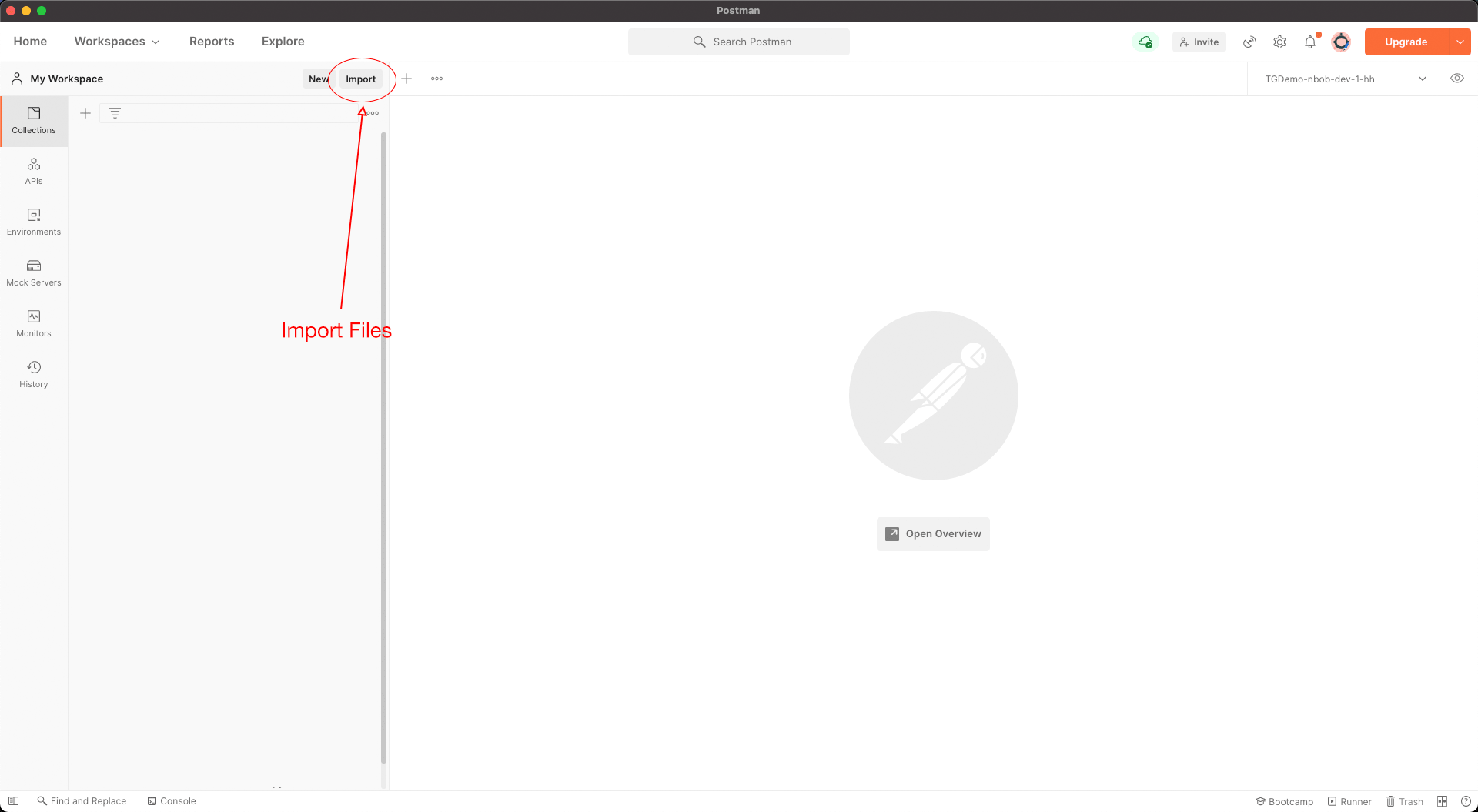
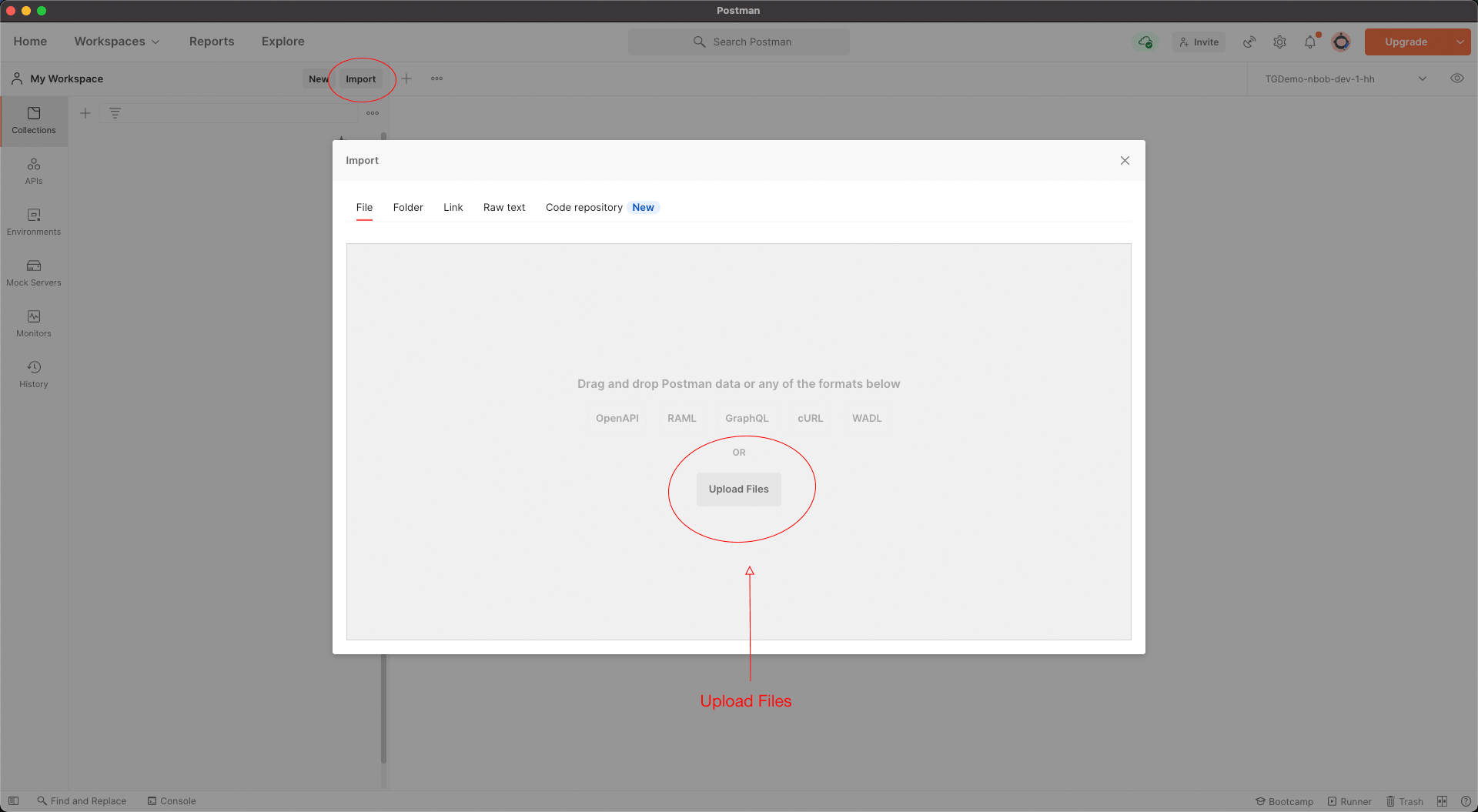
3.2) Check URLs and Environments are loaded successfully
3.3) Add Client Certificates Add the following ASPSP end points into Postman; https://rs1.sandbox.ob.allica.bank https://as1.sandbox.ob.allica.bank/token
The CRT should be set to the transport certificate downloaded from the open banking directory. The Key value should be set to the private key for the transport certificate.
3.4) SSL Certificate Verification (TPP) In Postman settings ensure SSL Certificate Verification is set to off.
Step 4: Account Information Flow
4.1) Client Credentials Grant
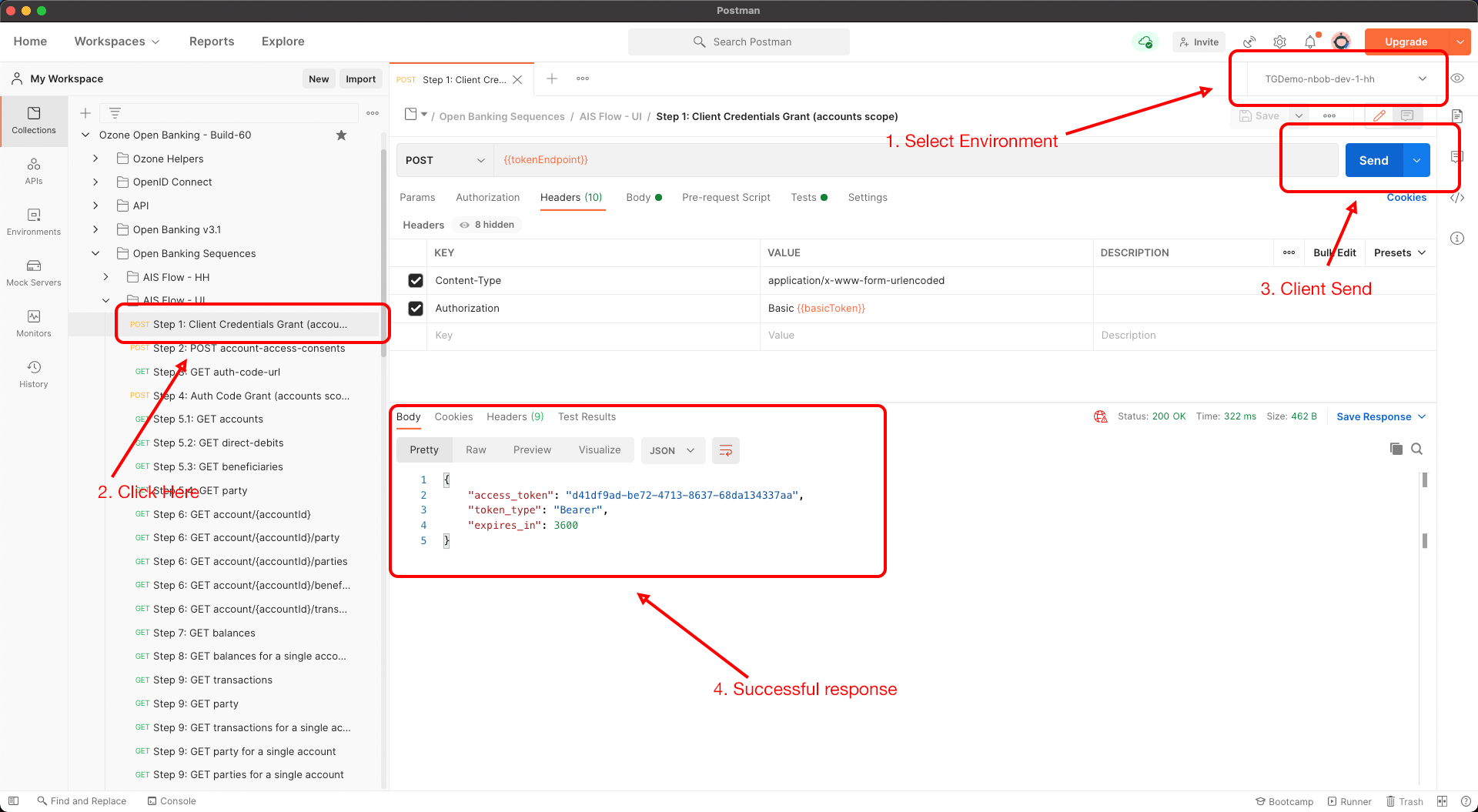
4.2) Account Access Consent
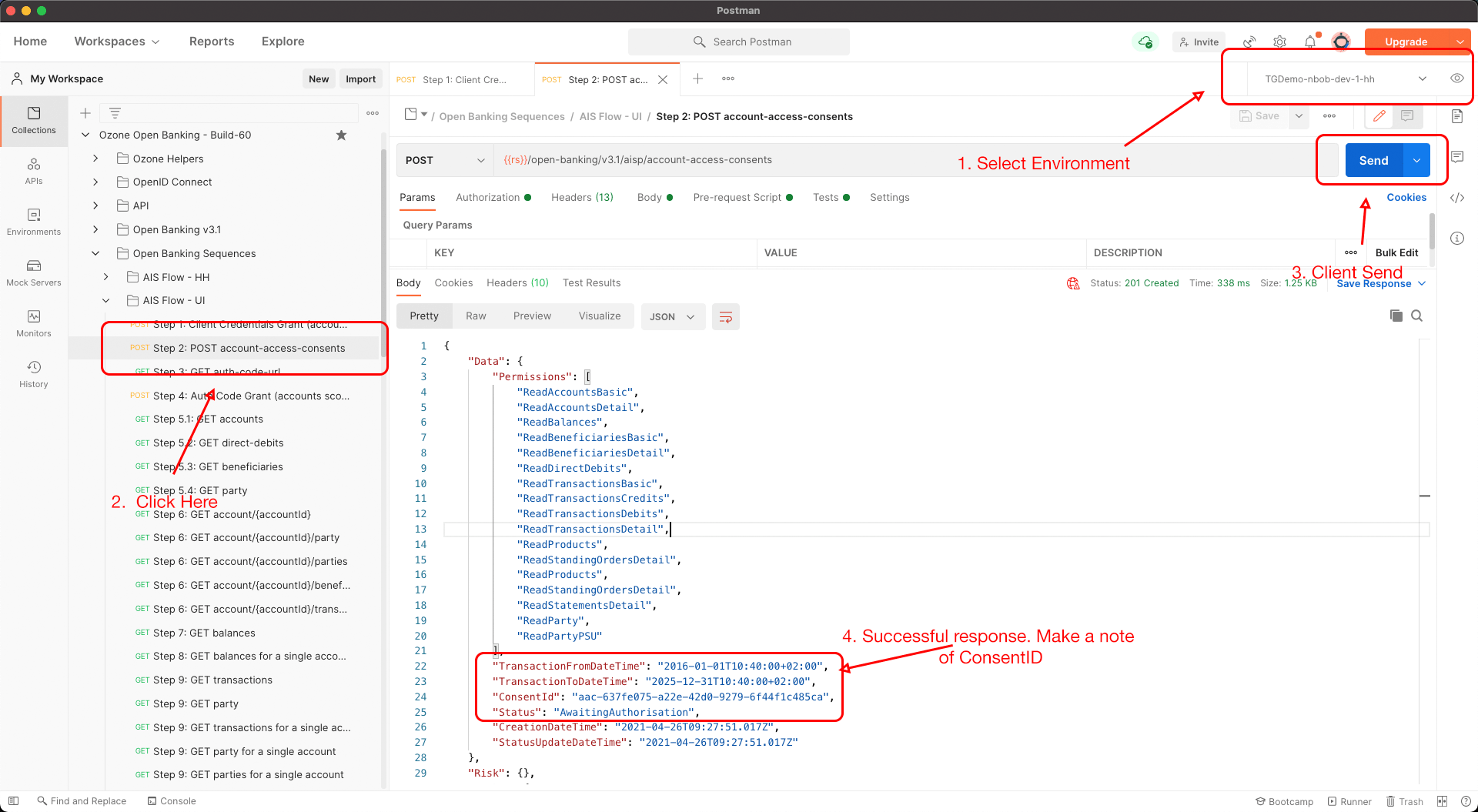
4.3) PSU Consent Flow TPPs can generate the consent flow URL by postman
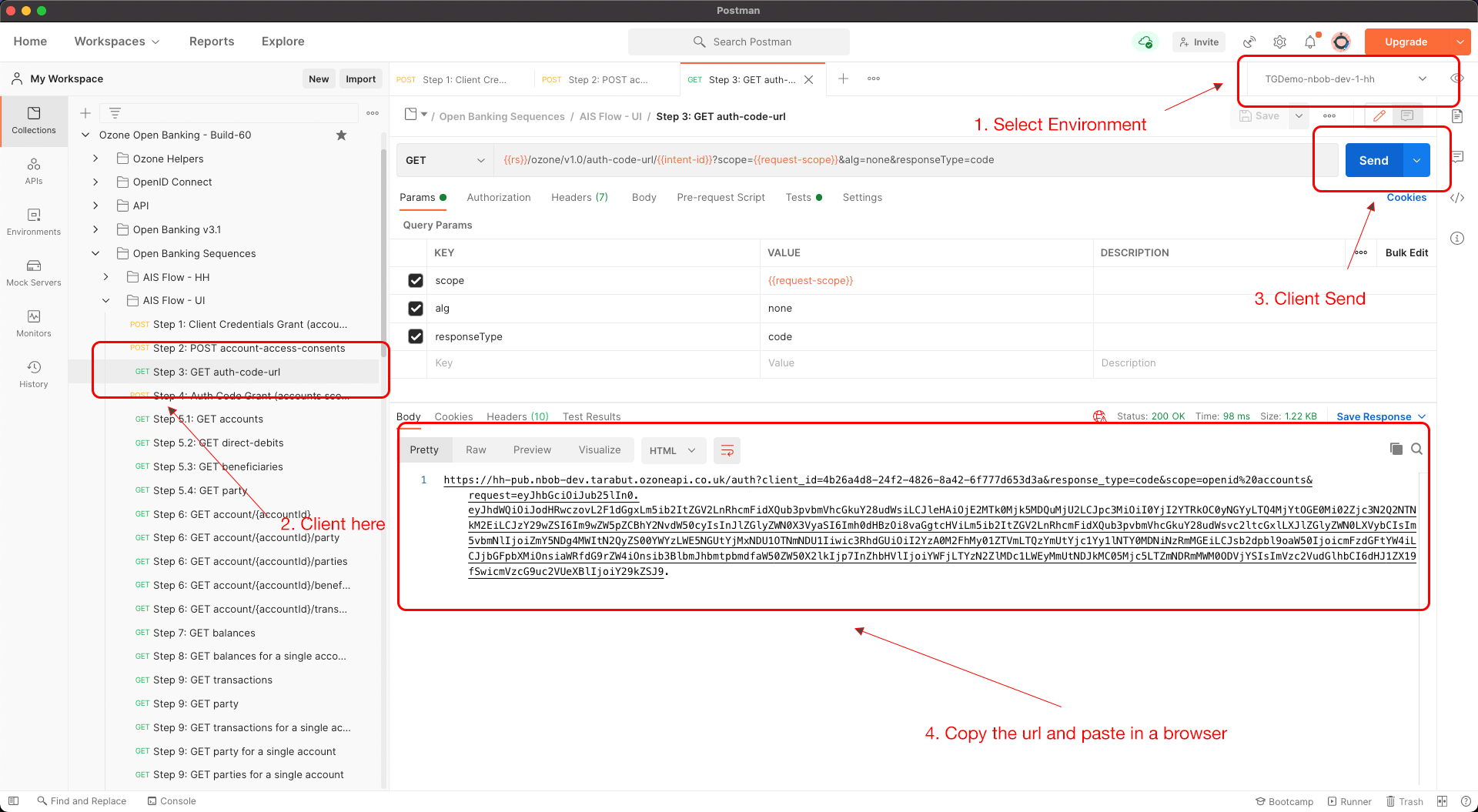
Once the URL is constructed, open the URL to initiate the PSU consent flow
Authenticate user
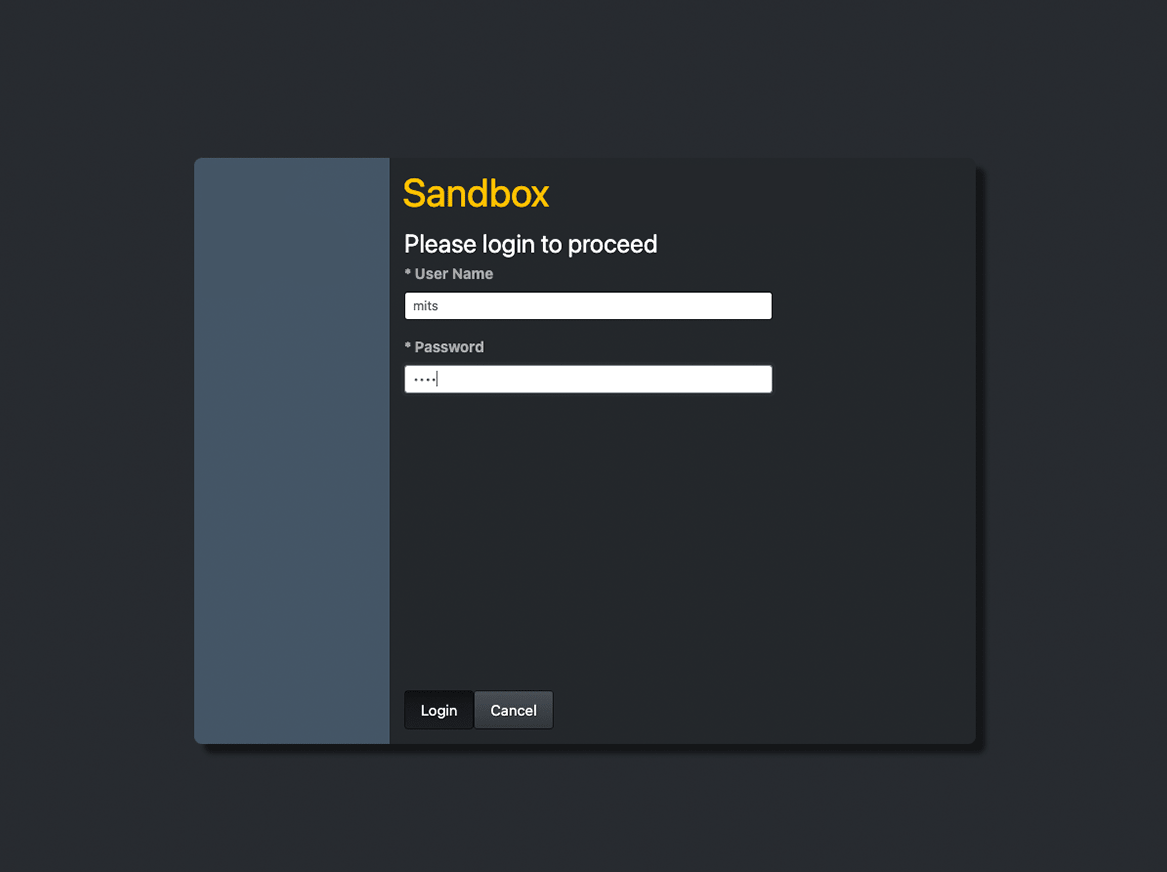
Sandbox User Accounts
Each password is the username followed by a full stop. The full stop is part of the password.
| User | Password |
|---|---|
rora |
rora. |
mits |
mits. |
ivsa |
ivsa. |
Select accounts
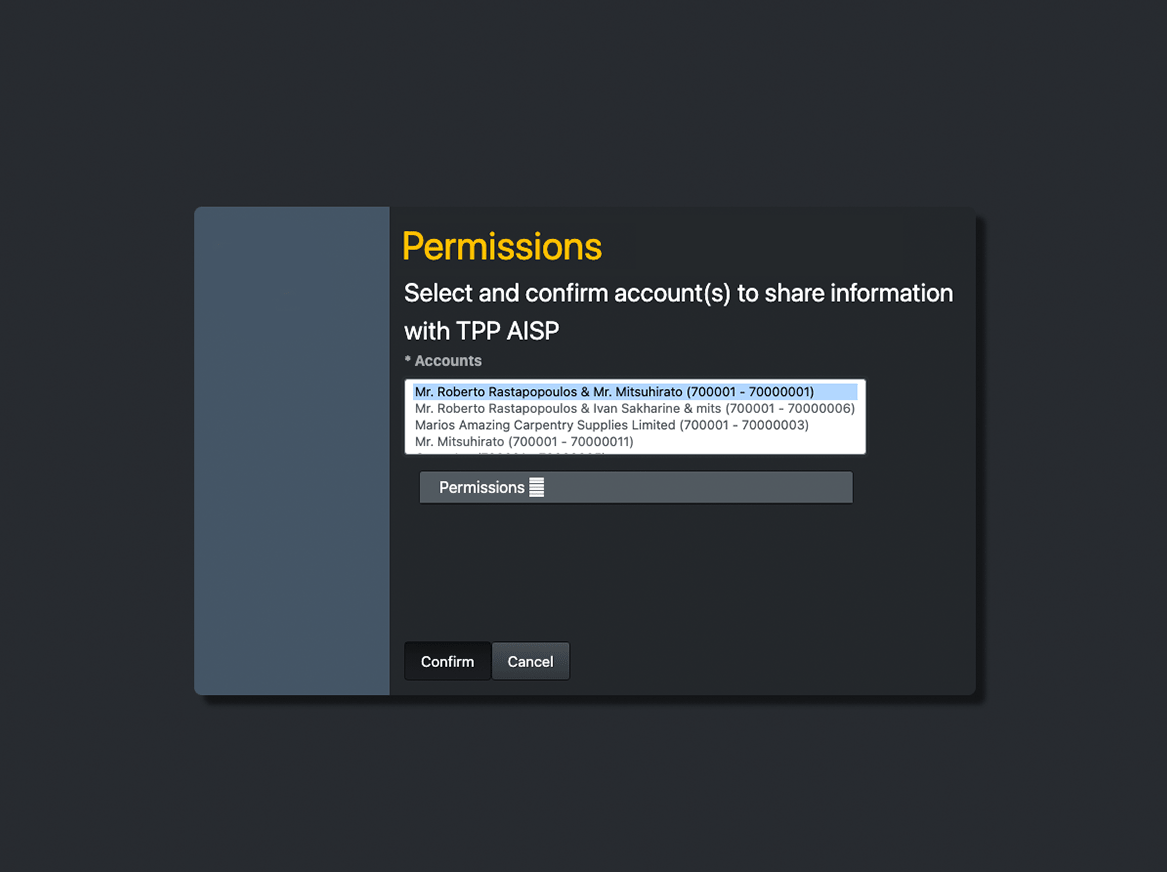
Once the PSU consent is successful, Allica will redirect back to the redirect URI. Copy the Authcode from the URL

4.4) Generate the access token
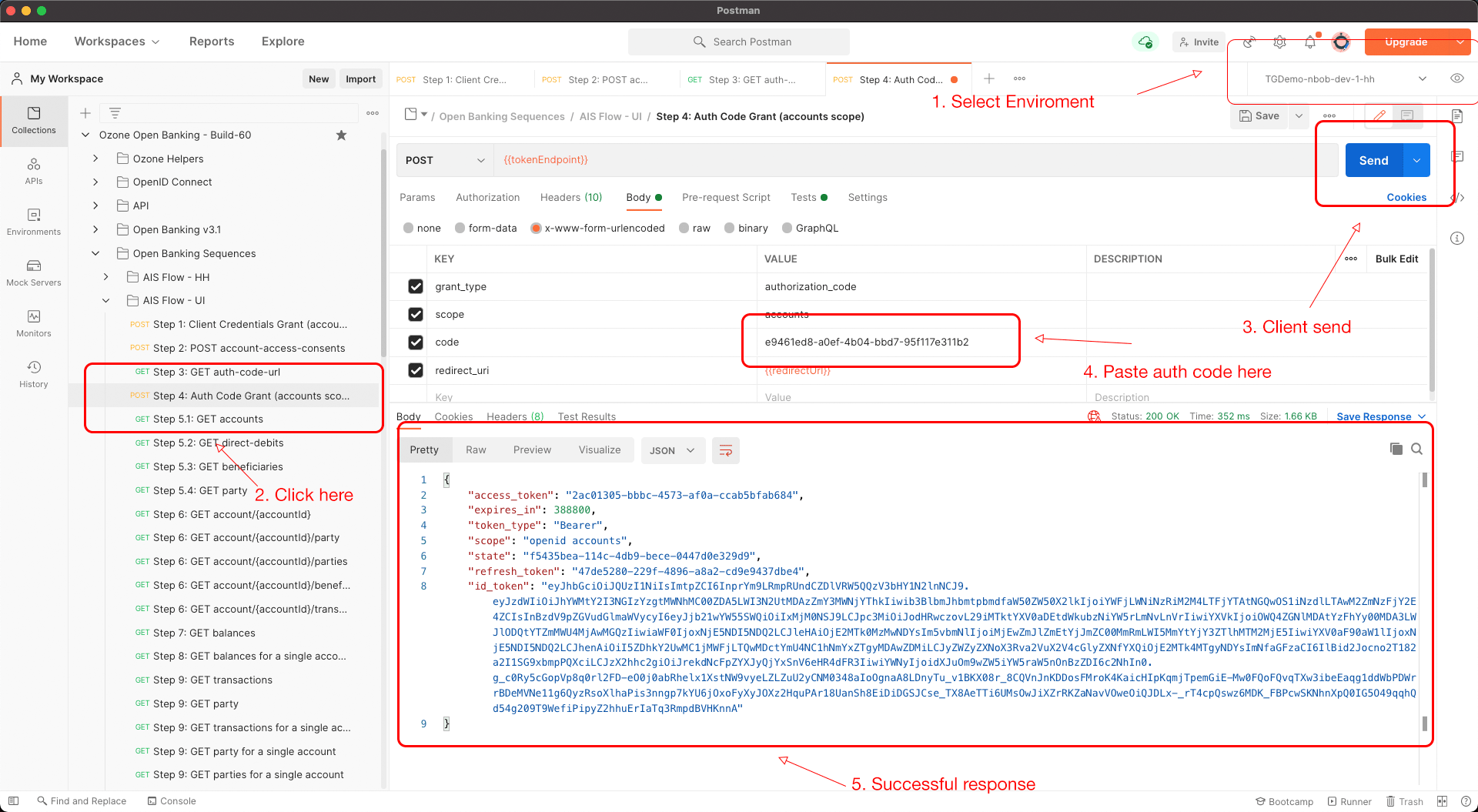
Step 5: Retrieve Account and Transaction Data
5.1) Retrieve Account Data with GET /accounts
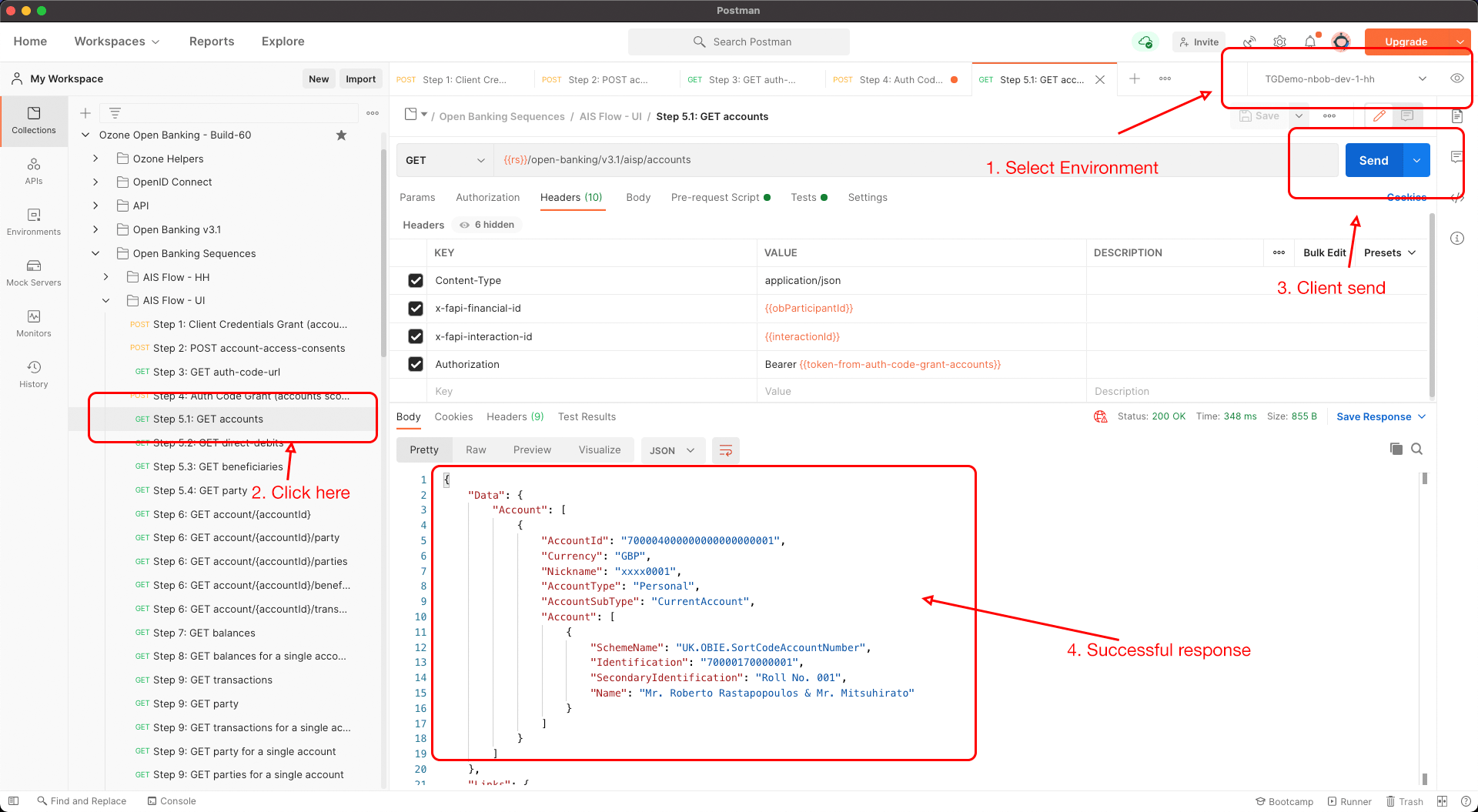
5.2) Retrieve Transaction Data with GET /accounts/{AccountId}/transactions, using an AccountId returned by GET /accounts.
GET https://rs1.sandbox.ob.allica.bank/open-banking/v4.0/aisp/accounts/{AccountId}/transactions
Authorization: Bearer <access token from step 4.4>
x-fapi-interaction-id: <UUID>
The bulk
GET /transactionsendpoint is not supported. Request transactions per account. Results are paginated at 100 transactions per page; followLinks.Nextfor the next page.